For our final project, my group decided to do a live database tutorial that would assist a fictional 8th grade class in their research for a fictional biographic research project. This activity would also assist the fictional teacher who assigned the project, as their students would be better prepared to complete the assignment. Choosing a topic for our lesson was fairly easy: we knew we wanted to teach middle school students and we also wanted to teach a database, so we browsed Dominican's offerings to see what would be age-appropriate and what could be linked with an actual classroom assignment (as opposed to doing a database walk-through just because). Britannica Online has a very user friendly interface that can be used by students young and old, and we liked the extensive biographies it has, so we went with that.
Creating the lesson once we had an end assignment and a few potential standards/outcomes took some trial and error, but on the whole was very productive. We tossed around ideas for database scavenger hunts, worksheets, and team competitions to find certain information. We all wanted to make the tutorial fun, interactive, and not too stressful - using the database isn't the assignment our fictional students are getting graded on, so our goal was more focused on getting them comfortable with the different features and with composing appropriate research questions than in quizzing them on the database itself.
The easiest way to engage learners is to get them doing something. Make it interactive, make the student the expert, and keep the stakes low. Our scavenger hunt starts with easier questions that get more challenging as the students explore, but there is no wrong way to find the answers. The important part is that the students try, and that they observe how their classmates found the information. If two students find the same information in two different ways, they are both right! I'm hoping the "challenge" factor engages our learners and increases their comfort with the database.
Showing posts with label lis724. Show all posts
Showing posts with label lis724. Show all posts
Wednesday, August 22, 2018


Monday, August 20, 2018
Pathfinder Reflection
After thoroughly enjoying the curation assignment, I was interested in preparing a more focused pathfinder. Honestly, curating themed resources is something I do fairly naturally, but intentionally sitting down to do it still had its challenges. First, I needed a topic. I love and crave limits and the creativity they foster, so on the one hand, I was excited to narrow down my resource gathering, but on the other hand I was overwhelmed by my options of topics! And of course, after all my practice in creating lesson plans and working with classroom teachers to create co-curricular assignments, I couldn't think of ANYTHING I wanted to do.
I started a few different pathfinders to see which topic's potential resources felt best, and to see which curation tool I wanted to use. I looked at the LIS 724 website, saw a few tools that I hadn't used before, tried Scoop.It, hated it, and went back to Wakelet. It's just so streamlined. Pearltrees would have also worked, but I liked being able to add more text to explain my resources. I started gathering mermaid resources, fairytale retelling resources, and Chicago resources, and found that I was most interested in collecting a more specific set of Chicago history resources - primary sources and artifacts. That led me to gathering websites, books, encyclopedias, and archives related to Chicago's history in general and four events in particular: Fort Dearborn, the Great Chicago Fire of 1871, the World's Columbian Exposition of 1893, and the Century of Progress Exposition of 1933-34. Chicagoans and other discerning historians will recognize these events as the ones represented by the four stars on Chicago's flag, which for me was the easiest way to narrow down the expanse of Chicago history.
 I know I'll be using pathfinders throughout my career and in my personal life (my booklists here are a sort of pathfinder) for years to come, so it's helpful to try out new platforms and topics that students or curious Chicagoans may actually find useful!
I started a few different pathfinders to see which topic's potential resources felt best, and to see which curation tool I wanted to use. I looked at the LIS 724 website, saw a few tools that I hadn't used before, tried Scoop.It, hated it, and went back to Wakelet. It's just so streamlined. Pearltrees would have also worked, but I liked being able to add more text to explain my resources. I started gathering mermaid resources, fairytale retelling resources, and Chicago resources, and found that I was most interested in collecting a more specific set of Chicago history resources - primary sources and artifacts. That led me to gathering websites, books, encyclopedias, and archives related to Chicago's history in general and four events in particular: Fort Dearborn, the Great Chicago Fire of 1871, the World's Columbian Exposition of 1893, and the Century of Progress Exposition of 1933-34. Chicagoans and other discerning historians will recognize these events as the ones represented by the four stars on Chicago's flag, which for me was the easiest way to narrow down the expanse of Chicago history.
Monday, August 13, 2018
Database Tutorial Reflection
Before starting this assignment, I was not looking forward to screencasting and recording because, like most human people, I do not like hearing my own voice played back at me. Having to use voice overs in our Digital Storytelling assignment helped get me more comfortable with it, and once I had a basic script and went through my database routine a few times, I was ready to try it out.
I used Screencastify because it has such an easy interface for my Chromebook, and videos are saved automatically to my Google Drive. I found the process super quick and easy, and did a practice run of my tutorial. Take 1 helped me decide what was useful and better ways to click through the pages and options of my chosen database (JSTOR), and with a few notes to myself about enunciation, I was ready for Take 2. An almost immediate word flub sent me to Take 3, which gave me a pretty solid final product.

So solid, in fact, that I thought to myself, "I bet I could improve a few more things and streamline the process." BIG MISTAKE. The number one thing I have (re)learned with this assignment: a good and done job is better than great or perfect and not done. I should have been happy with Take 3 and its minor word stumble because Takes 4-7 all had technical difficulties (my laptop took extra time loading pages, the sound cut out at one point, and I could not get the Screencastify extension to stop recording, leading to 30 extra seconds of silence at the end of one video).
After a short break and a few deep breaths, I was ready to try again and take whatever okay product I could get. Luckily, Take 8 was the charm and here I have a Final Product.
From now on, I'll be extra forgiving of online tutorials with minor mistakes or flubs (including my own) - probably the creator of those just wants the product done and out there to help others, and has gone through multiple takes of even worse videos or just okay videos that they wanted to improve. As a lapsed perfectionist, I understand that done is better than perfect, but it's always a good to be reminded of that in practice!
I used Screencastify because it has such an easy interface for my Chromebook, and videos are saved automatically to my Google Drive. I found the process super quick and easy, and did a practice run of my tutorial. Take 1 helped me decide what was useful and better ways to click through the pages and options of my chosen database (JSTOR), and with a few notes to myself about enunciation, I was ready for Take 2. An almost immediate word flub sent me to Take 3, which gave me a pretty solid final product.

So solid, in fact, that I thought to myself, "I bet I could improve a few more things and streamline the process." BIG MISTAKE. The number one thing I have (re)learned with this assignment: a good and done job is better than great or perfect and not done. I should have been happy with Take 3 and its minor word stumble because Takes 4-7 all had technical difficulties (my laptop took extra time loading pages, the sound cut out at one point, and I could not get the Screencastify extension to stop recording, leading to 30 extra seconds of silence at the end of one video).
After a short break and a few deep breaths, I was ready to try again and take whatever okay product I could get. Luckily, Take 8 was the charm and here I have a Final Product.
From now on, I'll be extra forgiving of online tutorials with minor mistakes or flubs (including my own) - probably the creator of those just wants the product done and out there to help others, and has gone through multiple takes of even worse videos or just okay videos that they wanted to improve. As a lapsed perfectionist, I understand that done is better than perfect, but it's always a good to be reminded of that in practice!
Wednesday, August 8, 2018
Digital Storytelling Reflection
Similarly to creating book trailers, the process of digital storytelling can be both fun and overwhelming. There are so many options and ways to tell your library's story! A person has to know their own style, or their library's style, to help narrow down editorial choices and make sure that the video is reaching the right audiences.
Speaking of audiences, something to think about when creating digital media like library tours, interactive reading lists, or other video-based content is who the content is for. What age? Parents or the students/youth themselves? And beyond that, what level of familiarity or comfort does this audience have with media - that is, what is their media literacy? Will the audience be able to access your video and understand it? Does the video have both visuals and audio? Not all tools will be useful to all library patrons, so it's helpful to use a variety of them to reach the largest audience.
Overall, using digital storytelling to create short videos was a simple process that has many uses within the library and on a library's website. I'll definitely be thinking of ways to use digital storytelling in my own librarianship!
Speaking of audiences, something to think about when creating digital media like library tours, interactive reading lists, or other video-based content is who the content is for. What age? Parents or the students/youth themselves? And beyond that, what level of familiarity or comfort does this audience have with media - that is, what is their media literacy? Will the audience be able to access your video and understand it? Does the video have both visuals and audio? Not all tools will be useful to all library patrons, so it's helpful to use a variety of them to reach the largest audience.
Overall, using digital storytelling to create short videos was a simple process that has many uses within the library and on a library's website. I'll definitely be thinking of ways to use digital storytelling in my own librarianship!
Prezi Reflection
While I've seen Prezi presentations and heard various views on its usability and merit, this was my first time creating a Prezi. I found it fairly intuitive and easy to get started with, but the more I explored, the more there was to do and work with. Overall, Prezi seems like the type of tool that is easy to learn, but difficult to master.
The collaborative element of Prezi was very handy, as I could see live updates as my group mates worked on their sections. One of us could upload an image or type out a section of text and have the rest of us okay it or proof it for them on the spot. There weren't any issues of saving progress and sending updated files, or worrying about others' contributions.
As an option for presenting alongside Google Slides, Prezi does offer some cool elements - the movement of "slide" to "slide" being its most distinctive. I like that with Prezi, a presenter can jump around from topic to topic depending on where their presentation is going (hopping back a topic to answer a question, or skipping a topic that may not need to be covered, for example) without skipping through each individual slide. That same feature is one of Prezi's downfalls as well, as all the jumping and hopping may leave audience members a bit woozy. I think that Google Slides will always be my go-to out of comfort and ease of use, but I'll definitely keep Prezi as a backup for times I want to present things in a more holistic versus narrative way.
The collaborative element of Prezi was very handy, as I could see live updates as my group mates worked on their sections. One of us could upload an image or type out a section of text and have the rest of us okay it or proof it for them on the spot. There weren't any issues of saving progress and sending updated files, or worrying about others' contributions.
As an option for presenting alongside Google Slides, Prezi does offer some cool elements - the movement of "slide" to "slide" being its most distinctive. I like that with Prezi, a presenter can jump around from topic to topic depending on where their presentation is going (hopping back a topic to answer a question, or skipping a topic that may not need to be covered, for example) without skipping through each individual slide. That same feature is one of Prezi's downfalls as well, as all the jumping and hopping may leave audience members a bit woozy. I think that Google Slides will always be my go-to out of comfort and ease of use, but I'll definitely keep Prezi as a backup for times I want to present things in a more holistic versus narrative way.
Monday, August 6, 2018
Makerspace Inventory Reflection
The kind of makerspace that comes from the combined imaginations of a school, academic, and public librarian is both fun and flexible. While my groupmates and I all agreed that new technology is super cool and useful, we wanted our space to reflect more hands-on making with technology as a bonus. We also felt that our space would be most used and useful if it was mobile and able to support various library programs. Many libraries have a community room or all-purpose room that could be temporarily set up as a makerspace, then put back to common use when no program is in session.
Once we had our basic parameters set, it was off to shop for our various programs. I had the idea of incorporating a community garden, so I searched for ways that could work and looked at other libraries' garden spaces to see what I liked and didn't like. This garden tower on wheels seemed simple and fun, and I liked that I could get a starter kit with seeds and potting mix. A system like this one could be used indoors and out, and year-round to grow different plants, specifically fruits and vegetables. While we paired it up with a Jack and the Beanstalk program for our mythical Summer Reading Program, it could also be used for programs with food, cooking, plant biology, composting, erosion, community development, or geology themes.
After finding my big ticket item, I also shopped around for other gardening and garden craft supplies. Some things I knew would last more than one summer/programming year, while other items I found were consumables, which would need to be noted in the budget so they could be replaced. That was a learning curve for me during this project: how much of our $3,000 would we spend on investment items versus things that would be used up? Art supplies will always get used, but then money has to be spent to replace them. Cameras and iPads last longer, but they cost more and what if they don't get as much use as you'd like? This is clearly an issue of both balance and knowing your own library/library patrons. It's also a good argument for renting equipment or sharing with other nearby libraries, at least until you know how much your patrons will use something.
All-in-all, I enjoyed creating a pretend program and shopping for it, and my groupmates both agreed that we wish we could have our makerspace and made up summer reading programs for real. It also got me looking around to see what local makerspaces are doing, and if I can learn anything from their experiences.
Once we had our basic parameters set, it was off to shop for our various programs. I had the idea of incorporating a community garden, so I searched for ways that could work and looked at other libraries' garden spaces to see what I liked and didn't like. This garden tower on wheels seemed simple and fun, and I liked that I could get a starter kit with seeds and potting mix. A system like this one could be used indoors and out, and year-round to grow different plants, specifically fruits and vegetables. While we paired it up with a Jack and the Beanstalk program for our mythical Summer Reading Program, it could also be used for programs with food, cooking, plant biology, composting, erosion, community development, or geology themes.
After finding my big ticket item, I also shopped around for other gardening and garden craft supplies. Some things I knew would last more than one summer/programming year, while other items I found were consumables, which would need to be noted in the budget so they could be replaced. That was a learning curve for me during this project: how much of our $3,000 would we spend on investment items versus things that would be used up? Art supplies will always get used, but then money has to be spent to replace them. Cameras and iPads last longer, but they cost more and what if they don't get as much use as you'd like? This is clearly an issue of both balance and knowing your own library/library patrons. It's also a good argument for renting equipment or sharing with other nearby libraries, at least until you know how much your patrons will use something.
All-in-all, I enjoyed creating a pretend program and shopping for it, and my groupmates both agreed that we wish we could have our makerspace and made up summer reading programs for real. It also got me looking around to see what local makerspaces are doing, and if I can learn anything from their experiences.
Wednesday, August 1, 2018
Book Trailer Reflection
While I think the final products are pretty neat, creating book trailers can easily turn into a rabbit hole of finding music, images, and video. I think that if I'm going to continue with them, I'd need a way to streamline the process - namely, a way to not get distracted by all the flashy options and the overwhelming directions one could go with 30 seconds to a minute of time.
Choosing the book to trailer was easy - The Forgotten Book is a new YA title that I recently finished, and it's an easy sell to the right reader. Anyone looking for a contemporary Pride & Prejudice retelling set in a boarding school in the German countryside will want to check it out. Also, there's a book that makes the things you write in it come true, a missing schoolgirl, and other fairytale-esque details.
Then came choosing the video platform. Animoto was simple, though even with its pre-made storyboards and limited design control, I still found myself spending ample time sorting through songs, trying out different images, and reworking my final product. I could see myself using this platform again, and I think that once I've made a few different videos, knowing which storyboard/song/etc I want will come easier.
For my second trailer, I choose to use WeVideo since it had the easiest sign up/was the most clear about having a free plan. At first glance, WeVideo seems to give the user more freedom. The video editing and effects tools were easy to play around with, and I had more control over the music as well. Once I realized I was "trying out" a few premium features, I had to dial back a few of the edits I had made, but there were still enough tools for me to create. I modeled my WeVideo video after my Animoto one to keep things simpler, but was still able to personalize more aspect (the option for multiple songs, fading in and out of each screen).
I've usually seen book trailers done by students or teens for either an assignment or because they love a book that much, and I can definitely see how this platform could be useful for a teacher or librarian to engage kids with different technology in relation to something they are reading. In a public library setting, it would be cool to use one of these platforms in library programming - technology or makerspace-wise, then let kids play around with it and create their own book/movie/etc trailers that the library could then share via social media or embed to a website, similar to what the Chicago Public Library has done using its YOUmedia space.
Choosing the book to trailer was easy - The Forgotten Book is a new YA title that I recently finished, and it's an easy sell to the right reader. Anyone looking for a contemporary Pride & Prejudice retelling set in a boarding school in the German countryside will want to check it out. Also, there's a book that makes the things you write in it come true, a missing schoolgirl, and other fairytale-esque details.
Then came choosing the video platform. Animoto was simple, though even with its pre-made storyboards and limited design control, I still found myself spending ample time sorting through songs, trying out different images, and reworking my final product. I could see myself using this platform again, and I think that once I've made a few different videos, knowing which storyboard/song/etc I want will come easier.
For my second trailer, I choose to use WeVideo since it had the easiest sign up/was the most clear about having a free plan. At first glance, WeVideo seems to give the user more freedom. The video editing and effects tools were easy to play around with, and I had more control over the music as well. Once I realized I was "trying out" a few premium features, I had to dial back a few of the edits I had made, but there were still enough tools for me to create. I modeled my WeVideo video after my Animoto one to keep things simpler, but was still able to personalize more aspect (the option for multiple songs, fading in and out of each screen).
I've usually seen book trailers done by students or teens for either an assignment or because they love a book that much, and I can definitely see how this platform could be useful for a teacher or librarian to engage kids with different technology in relation to something they are reading. In a public library setting, it would be cool to use one of these platforms in library programming - technology or makerspace-wise, then let kids play around with it and create their own book/movie/etc trailers that the library could then share via social media or embed to a website, similar to what the Chicago Public Library has done using its YOUmedia space.
Monday, July 30, 2018
Promotional Flyer Reflection
In creating this week's assignment (a promotional flyer for library programming or an event), I pretty quickly narrowed it down to Teen Read Week. I felt I could explore this year's theme, "It's Written in the Stars...READ!" with a sort of "teaser" flyer. If this was an event I was organizing for my library, each individual event would get its own promotion as the week itself got closer, and I would stick to my star background theme.
I used Canva for both a printable and digital flyer, though in reality, I'd stick with Canva just for digital use and/or if I needed a template. In the past, my design process has consisted of me sketching something out on paper, maybe printing out some text or graphics, then cutting and pasting the whole thing together. Obviously, this creates issues for repeating the process in the next month or year when a similar event happens (or if I am not around to recreate the promotional item), but if I am in charge of creative promotion, my talents lie in physical design - it's not that I'm digital design averse, I just have more skill in freehand design. The more I work digitally, the more intuitive these programs will feel, but I'll always enjoy creating with my hands.
Of course, I can (and do) start any digital work on paper, then do my best to translate it onto the screen, which is what I did here. I knew I wanted a starry background with text literally written "in"/onto it. I started with fewer stars, and put text inside, but that looked disorganized and was difficult to read/follow on the page. Instead, I made a path of stars across the page with the text over it, and I made an acrostic out of the main text. For the printable flyer, I kept the background white, with muted stars. The digital version has a black background, since I felt that would pop more onscreen.
I'd change a few things about this flyer in later versions (after more digital practice). Namely, I'd lean in to my acrostic more. I went back and forth on keeping it subtle, so you'd see it if you were looking, versus making those first letters larger/setting them apart in some way so it was obvious that "READ" is written in the stars, and after sitting with the design for a bit, now I wish I'd made it more obvious. I'd also play around more with the type - picking out fonts is both my least favorite and least exercised skill (again, since I prefer hand-lettering), but I'm sure I could create more contrast in the size or type.
What I truly appreciated about using Canva was the ease in which I could decide how to publish. I could download it as a PDF for printing, I could download it as a JPG or PNG for use online, and I could even embed the flyer straight to social media. Sharing a handcrafted flyer in all those ways would be difficult and look less professional, which means I'll be practicing lots more to bring my digital design skills up to speed!

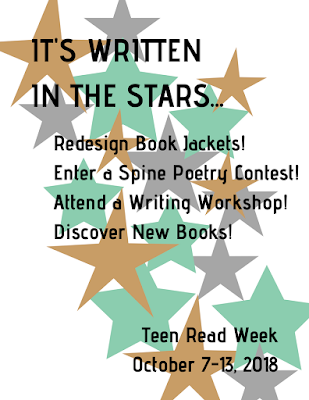
I used Canva for both a printable and digital flyer, though in reality, I'd stick with Canva just for digital use and/or if I needed a template. In the past, my design process has consisted of me sketching something out on paper, maybe printing out some text or graphics, then cutting and pasting the whole thing together. Obviously, this creates issues for repeating the process in the next month or year when a similar event happens (or if I am not around to recreate the promotional item), but if I am in charge of creative promotion, my talents lie in physical design - it's not that I'm digital design averse, I just have more skill in freehand design. The more I work digitally, the more intuitive these programs will feel, but I'll always enjoy creating with my hands.
Of course, I can (and do) start any digital work on paper, then do my best to translate it onto the screen, which is what I did here. I knew I wanted a starry background with text literally written "in"/onto it. I started with fewer stars, and put text inside, but that looked disorganized and was difficult to read/follow on the page. Instead, I made a path of stars across the page with the text over it, and I made an acrostic out of the main text. For the printable flyer, I kept the background white, with muted stars. The digital version has a black background, since I felt that would pop more onscreen.
I'd change a few things about this flyer in later versions (after more digital practice). Namely, I'd lean in to my acrostic more. I went back and forth on keeping it subtle, so you'd see it if you were looking, versus making those first letters larger/setting them apart in some way so it was obvious that "READ" is written in the stars, and after sitting with the design for a bit, now I wish I'd made it more obvious. I'd also play around more with the type - picking out fonts is both my least favorite and least exercised skill (again, since I prefer hand-lettering), but I'm sure I could create more contrast in the size or type.
What I truly appreciated about using Canva was the ease in which I could decide how to publish. I could download it as a PDF for printing, I could download it as a JPG or PNG for use online, and I could even embed the flyer straight to social media. Sharing a handcrafted flyer in all those ways would be difficult and look less professional, which means I'll be practicing lots more to bring my digital design skills up to speed!


Wednesday, July 25, 2018
Wiki to Sites Reflection
The closing of Wikispaces has put pressure on groups to move their online content elsewhere, this class being no different. Since I've worked with Google Sites in previous classes, creating my own resources for traveling on a budget and YA adaptations of "The Little Mermaid" by Hans Christian Andersen, I was happy to use it for a larger scale project.
Our first task, organizing the current wikis and their links, helped the project feel much more manageable. Once broken or outdated links were discarded and "like" topics were grouped together, there were much clearer parameters of the amount of information we were working with. The broader topics gave us more flexibility to group items, and since there are only six of us in the class, it was easy to divide and conquer.
Next came the testing of various curation tools, previewing how they might look live on the site, and working through what we wanted our final product to look like. We decided early on to use only a few curation tools, though we eventually landed on using just Pearltrees with a few modifications here and there. That made it easy to keep everyone on the same page and troubleshoot as we went along collecting our links, embedding into the site, and organizing collections.
The final organization of the page was a bit trickier to decide on, but after throwing around a few ideas - even broader categories, one mega page, random groups - matching each Pearltree collection to one of the class modules made the most sense. I learned a lot about how the embedding works on Google Sites, and how to group/ungroup items, which will be helpful in future uses of the platform.
Altogether, the process of creating a class site was simple - it helped that as a class we were willing to try things out, suggest ideas, and stay flexible - and the collaborative capabilities and intuitive controls of Google Sites ensured a quick transfer of class resources.
Our first task, organizing the current wikis and their links, helped the project feel much more manageable. Once broken or outdated links were discarded and "like" topics were grouped together, there were much clearer parameters of the amount of information we were working with. The broader topics gave us more flexibility to group items, and since there are only six of us in the class, it was easy to divide and conquer.
Next came the testing of various curation tools, previewing how they might look live on the site, and working through what we wanted our final product to look like. We decided early on to use only a few curation tools, though we eventually landed on using just Pearltrees with a few modifications here and there. That made it easy to keep everyone on the same page and troubleshoot as we went along collecting our links, embedding into the site, and organizing collections.
The final organization of the page was a bit trickier to decide on, but after throwing around a few ideas - even broader categories, one mega page, random groups - matching each Pearltree collection to one of the class modules made the most sense. I learned a lot about how the embedding works on Google Sites, and how to group/ungroup items, which will be helpful in future uses of the platform.
Altogether, the process of creating a class site was simple - it helped that as a class we were willing to try things out, suggest ideas, and stay flexible - and the collaborative capabilities and intuitive controls of Google Sites ensured a quick transfer of class resources.
Monday, July 16, 2018
Brochure Design Process
I learned several things in the process of creating an informational brochure for a fictional library. I went in thinking I knew exactly what I wanted to create, how I wanted it to look, and which design platform I would use. I quickly realized that the process of creation was going to take a bit longer than I thought, because it turns out design websites don't have direct access to my brain.
 After a few disappointing attempts using Lucidpress, I switched over to Canva. I'm sure I could've worked with Lucidpress (or any number of free design sites) and got what I needed from it eventually, but Canva felt more (that is, quickly) intuitive to my design process.

 After a few disappointing attempts using Lucidpress, I switched over to Canva. I'm sure I could've worked with Lucidpress (or any number of free design sites) and got what I needed from it eventually, but Canva felt more (that is, quickly) intuitive to my design process.
A word on my design process...it's most definitely not streamlined. I'm both a visual and hands-on learner, which basically amounts to me making multiple physical, but crappy, drafts of something before putting a final copy together. I like to see my design in action (plus I truly enjoy the art of crafting), which meant for this project I first had to create a few mini-mock-ups (tri-folding half sheets of paper) to work out which text sections would go where.

Another thing I learned/navigated was the tension between content and creation. Once I got going on Canva, I was ready to pick out fonts and colors and create striking contrasts...only I didn't quite have my content ready. I needed the images and text to carry on with the design, but the design was, admittedly, more "fun" to play around with.
Eventually I had a working brochure, and I can definitely see the use of this kind of product in a library. While I may be a Millennial, I still like to have paper copies of certain informational things, and I'm certainly not alone there. Libraries may or may not already have templates for brochures like the one I created, but either way, it's helpful to know I could jump in and update an existing brochure or create a new one (once I have all the necessary content and I've artsy-fartsy-ed my way through a few paper drafts, that is).
Wednesday, July 11, 2018
On Blogging
I'm taking two internet/technology classes this summer, one where I'm creating my own website and another more focused on using technology/apps as programming tools in a library. Both classes have me thinking about the future of this space. That I'll keep reviewing books and restaurants and movies and recapping my travels isn't the question, but I'm considering a platform switch, or a linked site that would house my blog along with my other internet-based creations.
Nine-ish years ago, when I first started writing here, Blogger was the easiest/quickest option for my needs. Since it's a Google product, I don't need a separate login, and I can import photos from my Drive super quickly (especially when I'm working from my Chromebook, which is sadly un-update-able and therefore not long for this world...but that discussion is for another post).
I might explore other blogging platforms or website options and decide this space is still the best (most convenient, simplest, does what I need it to do), but even then, I think it's due for some upgrades: cleaning up old links, refreshing the design, reorganizing a few of the pages. Stay tuned for new things in the future!
Nine-ish years ago, when I first started writing here, Blogger was the easiest/quickest option for my needs. Since it's a Google product, I don't need a separate login, and I can import photos from my Drive super quickly (especially when I'm working from my Chromebook, which is sadly un-update-able and therefore not long for this world...but that discussion is for another post).
I might explore other blogging platforms or website options and decide this space is still the best (most convenient, simplest, does what I need it to do), but even then, I think it's due for some upgrades: cleaning up old links, refreshing the design, reorganizing a few of the pages. Stay tuned for new things in the future!
Monday, July 9, 2018
Media Literacy, Intentionally
[As I make my way through grad school, I've had lots of opportunities to think about and reflect on various articles and readings for my classes. Below is a quick reflection on the necessity of staff development time in preparation for media literacy instruction.]
Media literacy, as many websites will inform you, is the ability to read and understand various forms of media, and from that, the ability to create new media in various forms (print or digital, text-based or image-based). It assumes the "reader" has a level of creative and critical thinking skills that allow them to access a material and interpret meaning from it. Seeing a TV commercial and understanding how it was developed or why it convinces consumers to purchase a product is media literacy. Analyzing online resources to determine which ones are reliable and relevant is media literacy. Participating in social media is media literacy.
It's clear from these examples and others in the article "Media Literacy, Powerfully..." that media literacy is a life skill, and one that must be fully integrated into school curriculum - not a brief unit separate from other content learning, or something that students learn on their own, through trial and error. Media literacy must be intentionally discussed and taught throughout a child's education. It also has a place in public library programming, where media users of all ages can practice and improve along with trusted information professionals (that is, librarians themselves!).
In order for our teachers and librarians to be able to teach and share the skill of media literacy with students, they must first be comfortable with the content, and with how they will present the content to students and library users. To this end, teachers, school librarians, and library staff need designated development time to ensure all instructors are on the same page and ready to commit to consistent media literacy instruction.
During this time, educators across several grade levels or library staff working with various departments can collaborate, scaffolding instruction for students of all ages. Media literacy education can be intentionally planned and integrated into all classes and programming, ensuring that new content builds on previous lessons and students are given the time and space to both view and produce media.
Media literacy doesn't happen overnight, and neither does media literacy education. Dedicated staff development time ensures future generations of media consumers and creators will be informed consumers and creators.
Media literacy, as many websites will inform you, is the ability to read and understand various forms of media, and from that, the ability to create new media in various forms (print or digital, text-based or image-based). It assumes the "reader" has a level of creative and critical thinking skills that allow them to access a material and interpret meaning from it. Seeing a TV commercial and understanding how it was developed or why it convinces consumers to purchase a product is media literacy. Analyzing online resources to determine which ones are reliable and relevant is media literacy. Participating in social media is media literacy.
It's clear from these examples and others in the article "Media Literacy, Powerfully..." that media literacy is a life skill, and one that must be fully integrated into school curriculum - not a brief unit separate from other content learning, or something that students learn on their own, through trial and error. Media literacy must be intentionally discussed and taught throughout a child's education. It also has a place in public library programming, where media users of all ages can practice and improve along with trusted information professionals (that is, librarians themselves!).
In order for our teachers and librarians to be able to teach and share the skill of media literacy with students, they must first be comfortable with the content, and with how they will present the content to students and library users. To this end, teachers, school librarians, and library staff need designated development time to ensure all instructors are on the same page and ready to commit to consistent media literacy instruction.
During this time, educators across several grade levels or library staff working with various departments can collaborate, scaffolding instruction for students of all ages. Media literacy education can be intentionally planned and integrated into all classes and programming, ensuring that new content builds on previous lessons and students are given the time and space to both view and produce media.
Media literacy doesn't happen overnight, and neither does media literacy education. Dedicated staff development time ensures future generations of media consumers and creators will be informed consumers and creators.
Subscribe to:
Posts (Atom)